
April 23, 2026
Why Incidents Repeat in DevOps Teams (And How to Stop It)

Chintan Viradiya
Author

Shyam Kapdi
Contributor

Shailesh Davara
Reviewer
Most engineering leaders I talk to say the same thing: “We keep fixing the same problems.”
A database goes down. The team scrambles, fixes it, writes a post-mortem, and closes the ticket. Three months later, a slightly different version of the same problem shows up. Same stress. Same scramble. Different ticket number.
This is not bad luck. It is not a people problem. It is a system problem - and it has a pattern.
The Real Reason Incidents Come Back
When an incident happens, the pressure is to restore service fast. That makes sense. But “restoring service” and “fixing the problem” are two different things.
What most teams do after an incident:
- Write a post-mortem
- Add a monitoring alert
- Create a Jira ticket labeled “tech debt.”
- Move on
What most teams do NOT do:
- Ask why the system allowed this to happen in the first place
- Change the underlying design
- Update how new engineers learn about this part of the system
- Verify the fix actually held
So the alert fires once. The ticket sits in the backlog. No one changes the design. Six months later, a new engineer joins, makes a reasonable decision based on what they see, and the same failure happens again.
The incident did not repeat because the team is bad. It repeated because nothing in the system changed.
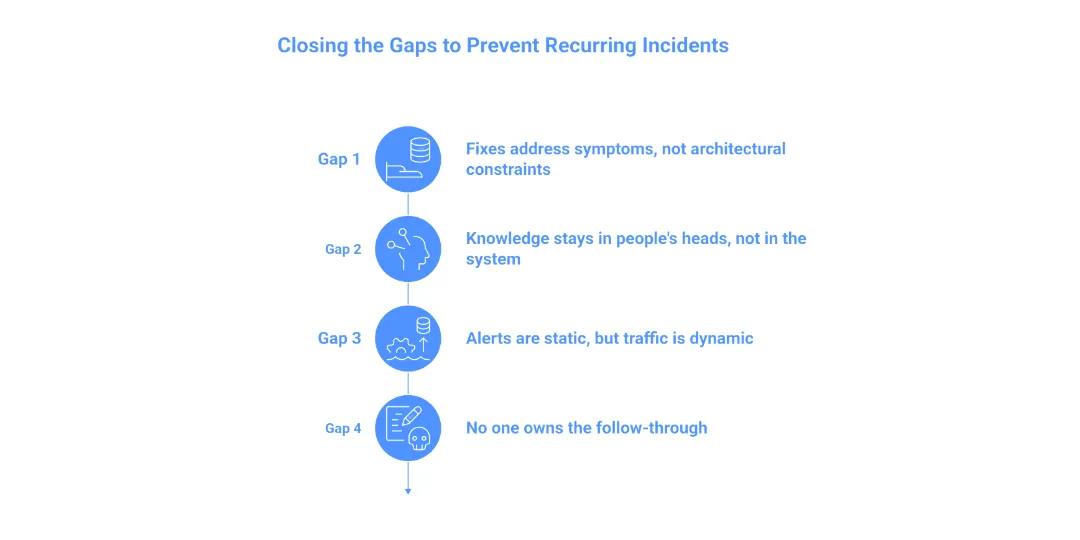
The Four Gaps That Keep Incidents Coming Back
After working with engineering teams across companies of different sizes, I see four gaps that recur.
Gap 1: The fix addresses the symptom, not the architectural constraint.
The database ran out of connections. The immediate fix: increase the connection limit. That buys you time, but it doesn’t solve the problem. The real question is: Is this a legitimate scaling requirement, or a resource leak? Without a root cause analysis of connection-pooling logic or zombie processes, you aren’t fixing a bug; you’re just moving the finish line for the next crash.
Gap 2: Knowledge stays in people’s heads, not in the system.
The engineer who dealt with the last incident knows what happened. They remember the quirk in the config, the upstream dependency that behaves strangely, the workaround that needs to be applied. When that engineer changes teams or leaves, that knowledge walks out with them. The next incident happens, and the new team has to figure it out from scratch.
Gap 3: Alerts are static, but traffic is dynamic.
Most teams set hard thresholds: “Alert me if CPU > 80%.” But as the business grows, those thresholds become noise or death traps. The mistake is treating alerts as “set and forget.” High-performing teams shift toward SLO-based alerting (Service Level Objectives), which measures the user experience rather than a specific server metric. If you aren’t evolving your monitoring logic alongside your traffic growth, your alerts will eventually lie to you.
Gap 4: No one owns the follow-through.
Post-mortems produce action items. Action items get assigned. Assigned tasks go into a backlog that nobody reviews. There is no meeting, no check-in, no accountability loop. The work simply does not get done. Not because people are lazy, but because there is no system to make sure it happens.
What Actually Stops Incidents from Repeating
This is not about buying a new tool or running more training. The teams that break the cycle do a few specific things differently.
They separate “restore” from “fix.”
When an incident happens, the immediate goal is to get the service back up. That is right. But within 48 hours, a separate conversation happens: what needs to change so this cannot happen the same way again? These are two different conversations with two different owners.
They treat follow-up actions like production work.
Action items from post-mortems go into the same sprint as feature work. They get estimated, assigned, and reviewed. If the action item cannot fit into the next two sprints, a conversation happens about risk. The work is not optional.
They build institutional memory into the system, not into people.
This means documentation that lives close to the code, not in a wiki nobody reads. It means architectural decision records that explain why things are built the way they are. It means onboarding materials that include known failure patterns for every major service. When knowledge is embedded in the system, it does not leave when a person does.
They review alerts and runbooks on a schedule.
Every quarter, someone goes through the alert list and asks: Is this threshold still right? Is this runbook still accurate? Does this alert map to a runbook at all? This sounds boring. It is. It is also the thing that prevents a 2 AM incident where the on-call engineer is following a runbook for a system that no longer exists.
They look for patterns across incidents, not just within them.
One incident is a data point. Five incidents are a pattern. Teams that stop the cycle look at a rolling six-month window and ask: what keeps coming back? Is it always the same service? The same type of failure? At the same time of day? Patterns are not obvious in individual post-mortems. They become obvious when you look across them.
Why We Use Open Standards to Track Reliability
At our company, we use open source tools across the incident management stack - not because they are free, but because they give us full visibility and control over how incidents are tracked, what data is captured, and how we close the loop.
Proprietary tools often create blind spots. You get dashboards and summaries, but not always the raw data you need to find patterns. Open source tooling, when set up well, lets your team ask any question about your incident history.
Tools like OpenTelemetry for observability, Grafana for visualization, and structured post-mortem templates stored in Git give teams a foundation where nothing is locked away. The history is yours. The patterns are visible. The follow-through is trackable.
This matters because stopping recurring incidents is a data problem as much as it is a process problem. You need to see what is actually happening, not what a vendor’s dashboard has decided to show you.
A Practical Starting Point
If your team is dealing with recurring incidents right now, here is where to start:
Go back six months. Pull every incident ticket. Group them by type - not by service name, but by failure type. Connection failures. Config errors. Dependency timeouts. Deployment rollbacks. Look at which type appears most often.
Pick the most common type. Look at the action items that came out of those incidents. How many were completed? If the answer is less than half, you have a follow-through problem, not a technical problem.
Fix the follow-through first. Everything else - better monitoring, better runbooks, better architecture - only works if someone actually does the work.
Conclusion
Recurring incidents are not a sign that your team does not care. Most engineering teams care a lot. Recurring incidents are a sign that the system around your team has gaps - in follow-through, in knowledge retention, in how fixes get prioritized.
Those gaps are fixable. But they do not fix themselves. Someone has to decide that fixing them is worth the time. In a company of 50 to 400 engineers, that decision almost always has to come from the top.
Building a system that truly learns from failure is a challenge every growing team faces. If you’re looking to bridge these gaps in your own infrastructure, To see how we approach platform engineering at Improwised Technologies.
Frequently Asked Question
Get quick answers to common queries. Explore our FAQs for helpful insights and solutions.
Incidents repeat because teams restore service but do not change the system that caused the failure. The root cause remains, so the same issue appears again in a slightly different form.
Restoring service brings systems back online quickly. Fixing an incident means removing the underlying cause so the same failure cannot happen again.
Post-mortems often produce action items, but those tasks are not completed or tracked properly. Without follow-through, the same problems remain in the system.
When no one is responsible for completing post-incident actions, tasks stay in the backlog. Without accountability, fixes are never implemented.
Fixing symptoms only delays failure. For example, increasing limits or restarting services does not solve underlying issues such as resource leaks or poor system design.
Written by
Chintan Viradiya
Chintan Viradiya is a DevOps Engineer at Improwised Technologies. Passionate about Infrastructure as Code and CI/CD pipelines, he focuses on optimizing cloud deployments and enhancing the security and performance of modern applications. He plays a key role in ensuring high availability and driving DevOps best practices across projects







Optimize Your Cloud. Cut Costs. Accelerate Performance.
Struggling with slow deployments and rising cloud costs?
Our platform engineering solutions are built on open-source tools and use AI natively across the workflow.